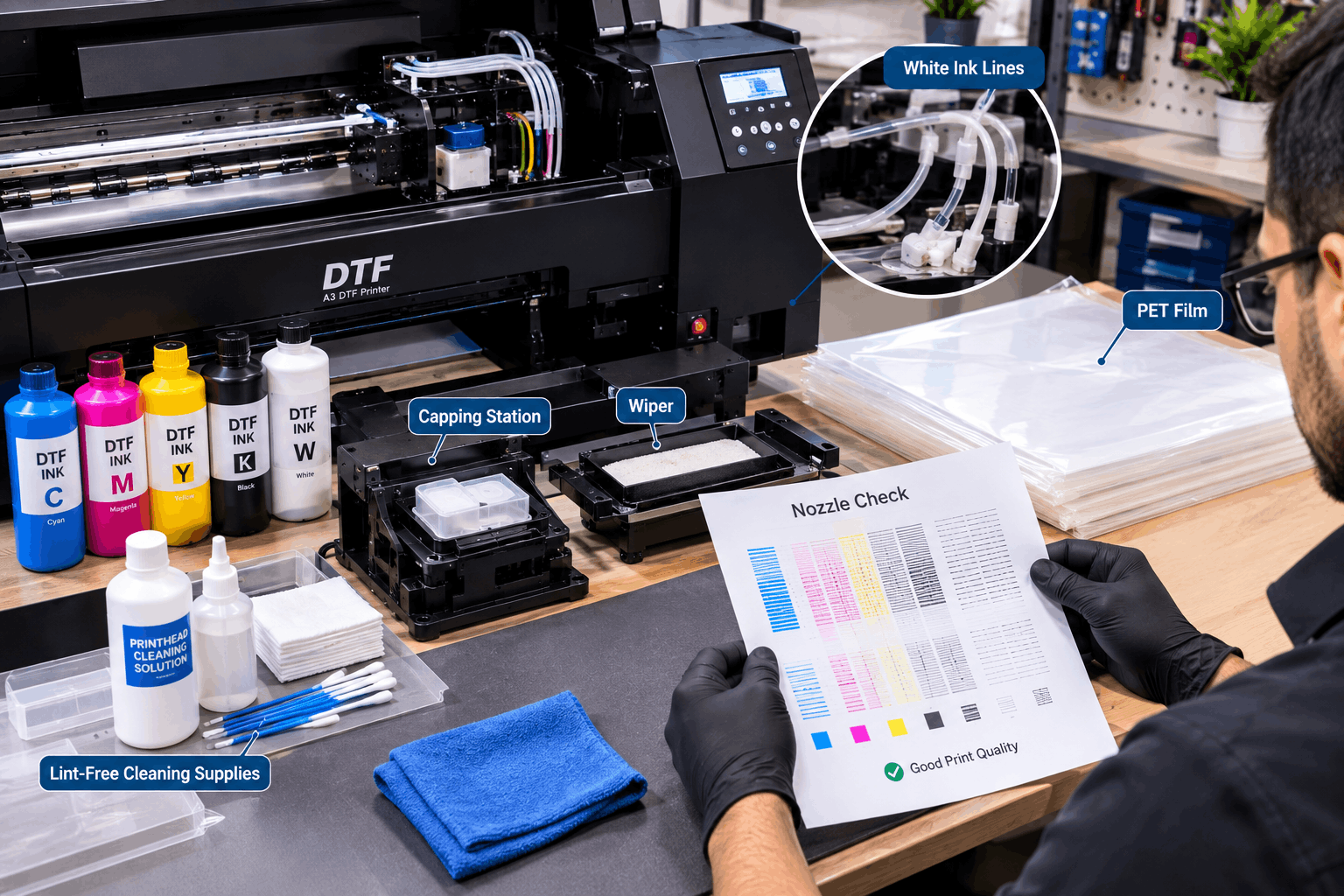
Regular DTF printer maintenance can reduce printhead problems by keeping ink flowing, removing residue, identifying missing nozzles early, and preventing dried ink from building up around important components. White ink deserves particular attention because its pigment can settle during idle periods.
A consistent routine is usually more practical than waiting until print quality becomes visibly poor.
Why Do DTF Printheads Develop Problems?
The printhead contains very small nozzles that place ink onto PET film.
For the printer to produce consistent designs, those nozzles need a reliable supply of ink. Dried ink, debris, poor ink flow, or extended inactivity can interfere with this process.
White ink can require additional attention. Its pigment may settle when the ink remains stationary.
This does not mean every missing nozzle is caused by white ink. Printhead problems can have several causes. However, regular inspection and maintenance can help operators identify issues before they affect a large production run.
Make Nozzle Checks Part of DTF Printer Maintenance
A nozzle check is one of the simplest ways to monitor printhead performance.
The printer creates a test pattern for its ink channels. A complete pattern indicates that the relevant nozzles are firing. Gaps can signal that part of the printhead needs attention.
Performing checks at appropriate intervals can help identify problems before printing customer artwork.
For example, imagine starting a batch of dark shirts without checking the white channel. If some white nozzles are missing, the underbase may become uneven across the entire batch.
A quick test can reveal that issue before film and ink are wasted.
Keep the Capping Station Clean
The capping station plays an important role in many inkjet maintenance systems.
It helps support the printhead when the machine is not actively printing and can be involved in cleaning or ink-drawing procedures.
Ink residue and debris can accumulate around this area. Therefore, it should be inspected and cleaned according to the printer manufacturer’s instructions.
Do not use random household cleaning products.
Printer components and inks have specific requirements. Use suitable maintenance materials and follow the procedure designed for the machine.
Check the Wiper Regularly
The wiper helps remove ink residue from the printhead surface on many DTF systems.
If the wiper becomes dirty, damaged, or heavily coated with dried ink, it may not perform its job correctly.
Inspection should therefore be part of routine maintenance.
Cleaning should be gentle and follow the equipment instructions. The printhead is a sensitive component, so aggressive handling can create more serious problems than the residue itself.
Why White Ink Management Matters
White ink gives DTF printing the opacity needed for many transfers on dark or coloured garments.
However, its pigment-heavy formulation also creates a maintenance consideration.
When white ink remains still, pigment can settle. Equipment may therefore use circulation or other ink-management features to support more consistent operation.
When evaluating a DTF printer, it is useful to consider white ink management and maintenance access alongside print dimensions and production features.
Built-in systems can support routine operation, but they do not eliminate the need for maintenance.
Avoid Ignoring the Printer During Idle Periods
A DTF printer may behave differently when used every day compared with a machine that remains inactive for extended periods.
Idle time matters because ink remains inside the system even when production stops.
If you know the printer will not be used for several days, follow the manufacturer’s idle-time or shutdown procedure.
Do not simply unplug the machine and assume it will be ready for normal production later.
The correct procedure depends on the equipment. Some systems may require particular maintenance steps before or after extended inactivity.
Following those instructions can help protect the ink system and printhead.
Keep Ink and Consumables Suitable for the System
Maintenance is not limited to cleaning physical components.
The materials used in the printer also matter.
Use inks that are suitable for the equipment and follow their handling and storage guidance. Avoid mixing products without confirming compatibility.
Ink condition can affect flow through the system.
Likewise, PET film, software settings, and the wider production workflow can affect print results. A visible defect should not automatically be blamed on the printhead.
Troubleshooting should begin by identifying when the problem first appears.
Do Not Over-Clean the Printhead
More cleaning is not always better.
Repeated cleaning cycles can consume ink and may not solve a problem caused by something else.
If a nozzle check shows an issue, follow the recommended troubleshooting sequence for the printer.
Start with the least disruptive appropriate maintenance step. Then check the nozzle pattern again.
If the problem remains, investigate further according to the manufacturer’s guidance.
Running cleaning cycles repeatedly without understanding the cause can waste consumables while leaving the actual issue unresolved.
Watch for Early Signs of Printhead Trouble
Printhead-related issues may appear before the printer stops producing usable prints entirely.
Possible warning signs include:
- gaps in nozzle-check patterns;
- missing sections of colour;
- uneven white ink output;
- unexpected banding;
- inconsistent ink coverage;
- repeated need for cleaning.
These symptoms can have more than one cause. Still, they indicate that the workflow should be checked before continuing a large job.
Early investigation can prevent a small issue from affecting many transfers.
Keep the Printer Area Clean
The environment around the printer can also support better maintenance.
Keep the machine on a stable surface. Avoid unnecessary dust and clutter around open film, ink, and maintenance areas.
Cleaning tools should have a dedicated storage location so they remain easy to find when needed.
The printer should also have enough surrounding space for routine access.
A machine squeezed tightly against walls or other equipment can be harder to inspect and maintain.
Good workspace planning therefore supports maintenance as well as production.
Create a Simple Maintenance Routine
A maintenance routine does not need to be complicated.
The important point is consistency.
Depending on the equipment and usage pattern, a routine may include checking nozzle output, inspecting relevant cleaning components, monitoring white ink behaviour, keeping the work area clean, and following the correct idle procedure.
Some tasks may need attention more often than others.
Always base the schedule on the printer manufacturer’s instructions rather than assuming every DTF machine requires identical maintenance.
It can also help to keep a simple record of recurring issues. If one ink channel repeatedly develops problems, those notes can make troubleshooting easier.
Preventive Care Is Easier Than Production Troubleshooting
DTF printhead problems can interrupt production and affect transfer quality. Regular maintenance helps operators notice ink-flow and nozzle issues before they become part of a customer order.
Nozzle checks, clean maintenance components, proper white ink handling, suitable consumables, and correct idle-time procedures all contribute to a more reliable workflow.
The most effective approach is consistent preventive care. By making DTF printer maintenance part of normal production rather than an occasional repair task, businesses can identify developing problems earlier and keep their printing workflow more predictable.